
The SmartThings ecosystem includes over a billion Galaxy devices and Samsung appliances, millions of customers, and an ever-increasing number of partners and developers. We believe that a large ecosystem of partners is the best way to bring joyful and meaningful moments to customers. Our Works with SmartThings (WWST) certification program makes it easy for you to help make these moments. At SmartThings, we’re working towards a more integrated, innovative, and impactful future. Join us.
Works with SmartThings products offer a robust and dependable experience, letting SmartThings users know they can expect a high-quality experience when using a Works with SmartThings product. After certification, your product will enjoy the many benefits provided by WWST, and will be visible to all SmartThings users in the SmartThings app.
This guide provides a detailed summary of certification, security, data privacy, performance requirements, compatibility, branding assets and legal agreements necessary to bring your experiences to the WWST program. Prior to obtaining certification, development and self-testing of your integration should be completed.
Benefits of WWST
Once you finish building your integration, you can start the Works with SmartThings certification process. If you do not believe that your integration will meet the standards required for certification, you are still able to connect your device with SmartThings.
Here are some of the many benefits to joining the Work with SmartThings program:
| Certified device | Non-Certified device | |
|---|---|---|
| Marketing | ||
| Listed in SmartThings App | ✅ | |
| Product display on Samsung.com | ✅ | |
| Brand association with Samsung SmartThings | ✅ | |
| Use of WWST logo | ✅ | |
| Bundling opportunities with Samsung Products* | ✅ | |
| Marketing Support* | ✅ | |
| Feature in SmartThings Mall section of the SmartThings mobile app* | ✅ | |
| Participation in Samsung and SmartThings announcements* | ✅ | |
| Technical | ||
| Controlled by Automations | ✅ | ✅ |
| Access to Early Access programs | ✅ | |
| Business | ||
| Participate in an open ecosystem | ✅ | ✅ |
| Data reports of integration use* | ✅ | |
| Dedicated Business Development support* | ✅ |
*at the discretion of SmartThings
SmartThings Analytics: Product Usage Insights
SmartThings Analytics is an exclusive tool designed for Works with SmartThings partners. It provides clear, PII-safe visibility into how customers are engaging with certified products within the SmartThings ecosystem. This data allows developers and product managers to make informed decisions to optimize product roadmaps and improve user experiences.
Key Benefits
- Real-World Engagement: Move beyond sales data to understand actual device usage, including active vs. registered device counts.
- Strategic Planning: Use data to validate feature usage and uncover new partnership or integration opportunities.
- Global Visibility: Analyze user bases by country or region to determine where products are most popular.
Core Features & Insights
- Product Combinations: Discover which other devices are frequently used in routines alongside your product (e.g., "Product X is used with Smart Lights 60% of the time"), revealing cross-category trends.
- Capability Usage: Identify which specific features (SmartThings Capabilities) users interact with most and which are underutilized.
- Time-Series Analysis: Toggle between daily, weekly, or monthly views to track engagement trends over time (7, 30, 90 days, or custom ranges).
- Category Filtering: Segment data by specific product categories to analyze performance across a portfolio.
Accessing Analytics
Access is restricted to partners with WWST-certified products. Data can be filtered by product (individual or portfolio), date range, and location (country/region). To view analytics:
- Navigate to the SmartThings Console and log in using your Samsung account.
- Select the Analytics section to view dashboards.
Certification Process Overview
The high-level certification process is outlined below. Depending on your integration type, there may be some variations to the certification process. If you are having difficulty or have questions, contact our team for support.
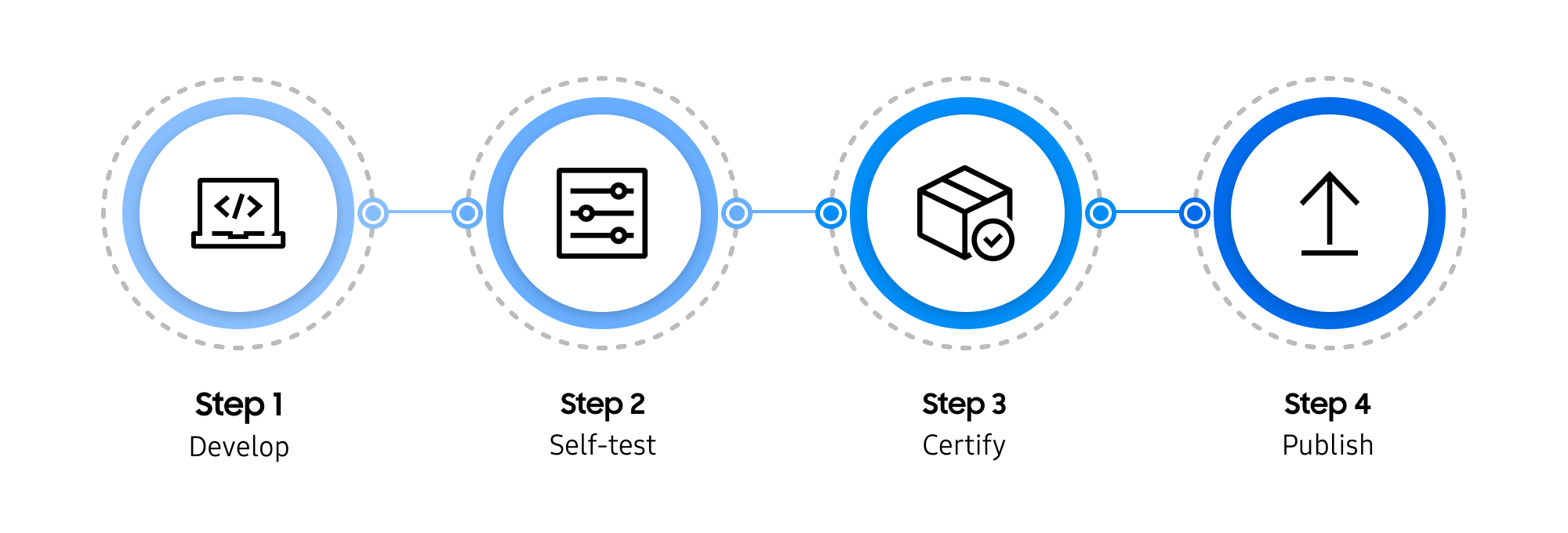
For an in-depth look at each step, visit Applying for Certification.
Begin the certification process by developing your device integration.
Hub Connected Devices (including Matter, Zigbee, and Z-Wave) can easily be integrated with SmartThings using the Edge Device Builder, a no-code solution to quickly get you certified and published.
Cloud Connected Devices require a Schema integration - learn more about developing your Cloud Connected integration here.
For a full list of supported device integrations and instructions on how to build your integration, visit Device Basics.
After building your device integration, you're ready to test your device.
Complete all QA and beta testing before submitting your product for certification. Ensure that your device contains all required Capabilities for your device category and does not contain any custom Capabilities.
Test Options
✅ The SmartThings Test Suite offers a comprehensive test suite for self-testing, and in some cases may eliminate the need to send your product to our Authorized Test Provider. The Test Suite enables you to thoroughly test your products’ capabilities across various scenarios, helping identify and address potential issues before deployment. Visit Test and Certify With the SmartThings Test Suite to learn more and to verify that your device qualifies for self-test certification.
✅ If your device does not qualify for self-test certification via the Test Suite, you will need to send your device to our Authorized Test Provider. Our Test Provider will issue a price quote for testing your device as part of the certification process.
Submit your product(s) for certification using the SmartThings Console. If you used the SmartThings Test Suite to complete product testing, you may be eligible for no-cost self-certification. Visit Test and Certify with the SmartThings Test Suite to learn more about this option.
Note that some devices and device types may require being shipped to our Authorized Test Provider after being submitted in the SmartThings Console.
SmartThings will review your certification application and contact you if any further information or action is required.
When certification is complete, the Works with SmartThings logo can be used for your product and package. The logo and guidelines can be downloaded as part of our press kit. SmartThings compatible (legacy program) and non-certified products are restricted from using the logo.
Certified products can be displayed in the SmartThings app and website, helping customers find the products they need. To have your product featured, visit Apply for Certification to learn more.
Certification Tools
The SmartThings Developer Center offers a range of development tools to help you build and certify your integration:
↗️ SmartThings Console
The SmartThings Console is your centralized hub for managing the entire Works with SmartThings lifecycle. Use this web portal to define your product attributes, submit products for certification, manage your live product catalog, and more.
↗️ SmartThings Test Suite
The SmartThings Console offers a comprehensive test suite. This unified environment enables you to thoroughly test your products’ capabilities across various scenarios, helping identify and address potential issues before deployment. Visit Test and Certify with the SmartThings Test Suite to learn more, or for a quick primer check out the related Samsung developers blog post.
↗️ Developer Workspace
Certifying a Mobile Connected Device? Use the legacy Developer Workspace to complete your certification submission.